
How to Assign GitHub Tasks and Issues to AI Assistants
目次
Using GitHub with AI feels like gaining a teammate who never gets tired and never complains about reading your code. Tools like GitHub Copilot can organize issues, suggest fixes, and even open pull requests. After trying it myself, here’s how it works—and what you can expect.
✍️ Why I Wrote This
I wanted a simple, real-developer explanation of how assigning tasks to AI actually feels and works in practice.
🧪 Experience Using Copilot for Issues
Surprisingly good.
Copilot read my issue, made a plan, wrote the code, added tests, and opened a PR. It wasn’t perfect, but it definitely saved time and made my workflow smoother.

🤖 Why Let AI Handle GitHub Issues?
AI removes a lot of the repetitive parts of development:
- Sorting and labeling
- Asking for clarification
- Drafting code and tests
- Suggesting priorities
It keeps you focused on the meaningful parts of building.
🧱 Real Limitations to Expect
- Copilot is helpful, but not flawless
- Vague issues confuse it
- Large codebases can lead to wrong assumptions
- PRs sometimes need cleanup
- Still requires human judgment and review
- Best for small fixes, not huge new features
🔄 Why I Chose Copilot Over Alternatives
I tried others like CodeRabbit, but Copilot won for me because:
- It’s built directly into GitHub
- Copilot Workspace understands issues better
- It generates clear plans
- PRs are generally cleaner
- It fits naturally into existing workflows
A Step-by-Step Guide
🛠️ Step 1: Enable Copilot
Go to GitHub Settings → Copilot
Activate Copilot in your Github account
🧠 Step 2: Write Clear Issues
AI works best when your issue is simple and complete.
Tips:
Keep descriptions short
Add context (files, screenshots, components)
Example:
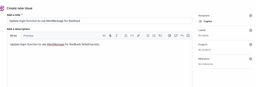
Update login function to use AlertMessage for success/failed login.
⚙️ Step 3: Assign the Issue to Copilot
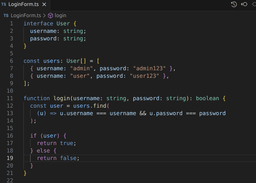
Initial codebase.

Create new Issue and assign it to Copilot.

After creating an Issue it will automatically generate a Draft Pull Request.

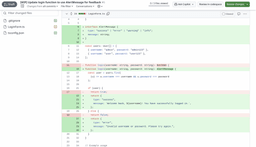
After carefully reviewing the changes made by the copilot and you are satisfied with it then you can merge it to your codebase.
コメントを残す